
Latest updates in BD® Research Cloud!
Test drive the new features available with the latest release of BD RC. Reimagine how you work!


What's new?
Take a look at the new features available with the latest release of BD RC. For more details on features in this release, visit the full release notes.
BD Horizon™ Panel Maker
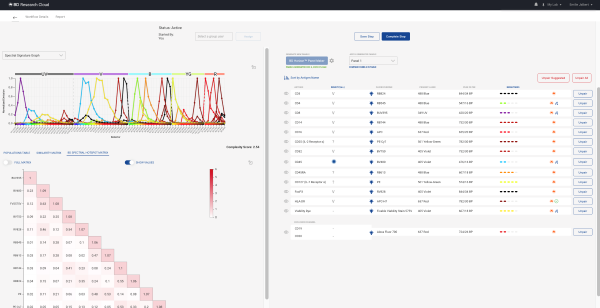
BD® Spectral Hotspot Matrix
- BD Horizon™ Panel Maker is an intelligent solution that simplifies complex panel design, tailored specifically for spectral and imaging flow cytometers, including BD FACSDiscover™ Instruments. With cytometer-specific, preloaded data and BD’s decades of expertise, you’ll get automated and optimized panel suggestions that reflect real-world performance. Whether you're starting from scratch or refining an existing panel, BD Horizon™ Panel Maker helps you design with confidence and scientific precision:
- Receive up to three optimized panel suggestions based on your selected markers and inputs.
- Evaluate panels using powerful visualization tools like the BD® Spectral Hotspot Matrix.
- Access BD’s extensive reagent catalog and even include dyes from multiple manufacturers.
- Instrument health monitoring capabilities in combination with BD® Remote Support Services. Connect your BD cytometers to BD Remote Support Services (formerly BD Assurity Linc™ Software), then log in to BD® Research Cloud (BD RC) to view the latest QC reports, charts for viewing the trends of your QC parameters, the disk storage space for your workstations and a convenient dashboard capturing the status of your cytometers.

- BD® Spectral Hotspot Matrix. Predict the unmixing-dependent spread for each fluorochrome in the context of a specific panel with the BD Spectral Hotspot Matrix. It helps identify problem areas in a panel indicating both the fluorochromes that will experience the most unmixing spread and the problematic combinations of fluorochromes that cause that spread.

- Create BD FACSDiva™ Software experiments with multiple plates. Easily add new plates or duplicate existing plates and then continue to edit specimens and keywords.

- New Notification System. Use the new notification center in BD RC to keep track of what’s going on for you. Be notified in the upper right corner of the software if there are new invites, new workflow steps, files are ready, or if something has been shared with you.

- Add functional dyes. Easily add functional dyes like DNA dyes or fluorescent proteins to your panels using the non-specific species and the “Add Markers” drop down.
And many more enhancements!

Upgrade for free
to a secure collaborative organization and explore these new features with your colleagues today!
Attend our live webinars!
Register and participate in our live webinars to follow along and get your questions answered in real-time. Our team of experts will assist you in maximizing the value of your analyses!
Take Me to Webinars

Love Flowjo?
Sign up for emails and keep the love flowing! Get our monthly newsletter plus be the first to hear about free webinars and product updates.
Stay Connected
