
FlowJo v10 records modifications to workspaces in an Action Log
Need to know exactly how and where a modification was performed or how long a workspace was open? These details are recorded in FlowJo v10’s ActionLog viewer. You can view the action log XML directly by navigating to the Power Band and reveal any actions performed on a workspace since it was opened and view the elapsed time since any activity was initiated. For longer term record keeping, you can save as a text file or copy and paste the XML to a text editor.
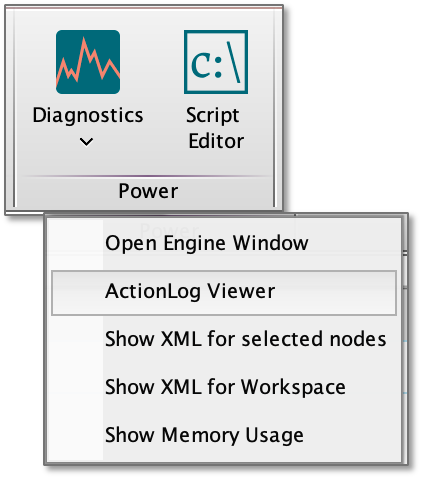
Figure 1 Action Log Viewer location
Whenever FlowJo is started an action log is created in:
MAC: Users\{Your user name}\Library\Preferences\ActionLogs\FlowJo
PC: Users\{Your user name}\AppData\Roaming\FlowJo10\ActionLogs\FlowJo
NOTE: Some of the intermediate folders will be hidden by default on each operating system.
The initial log is named log0.xml, and each subsequent log's name will increment. The log records actions up until FlowJo is quit. So if you open and close multiple workspaces, the actions across these workspaces will be recorded in a single action log file. Best practice for maintaining an audit trail of a single workspace is to create a folder for that workspaces action logs, be sure toQuit FlowJo after completing analysis of that workspace, and then move the newest action log to the folder designated for that workspace. This will create a series of user and time stamped records for each interaction with that workspace.
The ActionLog records the type of “clicks” or events that a user initiated during an open session. Action logs are stored for 30 days, or up to 256 logs and then are automatically deleted. Thus, if your lab requires these logs for long term record keeping you will want to move them to another location or folder with some regularity. The section below describes how to open and save and activity log using the ActionLog viewer.
For more detailed information about recording exact gate types, coordinates, parameters, layouts and other workspace artifacts, see our page about Workspace XML.
Action Log Structure
Action logs are stored as XML, essentially text readable by humans and computers. The beginning of sections in the log are noted by a title in brackets < Title > and ended with a paired </Title>. Each action log begins with <user> information that includes:
- The computer name and hardware address
- The user log in name if a FlowJo Portal account has been used for authentication
- License information.
This is followed by <session> information that contains:
- The date, time, duration of the analysis session
- Other meta data about the analysis system.
This is followed a series of <entry> pairs that indicate an action has taken place in the workspace. The first line indicates what type of action had taken place. The following line reveals what the specific action was. The time elapsed since the last action is recorded in the last line for each entry.
If you have any questions about the ActionLog Viewer or would like more information, please send us an email at flowjo@bd.com.